



AI brand video works best as a hybrid of real and generated. Film what must be real, generate the setting around it, and stay alert to where AI still slips. The difference between a polished video and a generic one comes down to a handful of decisions, and the six below are the ones worth getting right.

Green Screen: Why the Actor Needs to Be Real
Start with the one thing AI still struggles with. The faces look convincing in a still frame, but in motion something subtle gives them away, a smile that doesn’t quite reach the eyes, or lips slipping off the words as the shot runs on. If your video leans on a real person, film them. Generate the rest.
This is why green screen didn’t disappear when AI video arrived. It changed jobs. Instead of dropping your subject onto a stock beach, you film them clean against green and place them inside a setting the model builds: the location you can’t afford, or the city you’d otherwise fly a crew to. Production studios now film the “hero” talent and let AI build the setting around them, because it keeps the performance real while the backdrop becomes anything.
The way to think about it is to split the shot. You film the parts that need to feel real: the subject, the product in their hands, or the logo behind them. Then you generate the parts that are just expensive to stage: the skyline outside the window, the venue, or the crowd. Get the real parts right and the rest goes unnoticed.
The takeaway: Film what has to be real. Generate everything else. Decide shot by shot.
Prompting: Moving Beyond Typing to Directing
The difference between AI video that looks directed and AI video that looks generated usually isn’t the model. It’s how much direction went into it.
The most common giveaway is a flat, motionless shot. The subject is there, the lighting is fine, but the frame just sits there, a photograph pretending to be a film. That happens because a vague prompt leaves the model to guess. When it guesses, it defaults to the safest, dullest option: a locked camera and flat light.
The fix is to stop describing the scene and start directing it. Write the prompt the way you would brief a film crew. Models don’t respond to “make it cinematic” or “something dramatic”, since those are subjective words a model can’t act on. They respond to instructions: where the camera moves (a slow push-in, a tracking shot), how the scene is lit (soft window light, a hard rim light), and how fast it all happens. The more specific the direction, the less the model has to invent, and inventing is where the generic look comes from.
You don’t need film-school vocabulary to do this. You need to decide what the shot should feel like and say so plainly, the same call a director makes before the camera rolls.
The takeaway: Describe a scene and the model guesses. Direct it and the model obeys. The detail you skip is the detail it invents.

Voice and Consent: What You Can and Can’t Use
Sound is where a lot of AI videos quietly fall apart. The picture looks polished, then a flat, generic voice plays over it and the whole thing feels cheap. Audio is half the experience, and it deserves the same direction as the visuals. On a recent project, we used a prebuilt voice from ElevenLabs, which gives you a clean read out of the box. But a stock voice reads everything evenly until you shape it, so the direction lives in the script. We broke up the long lines, used punctuation to set the pauses. Write the line the way a person would actually say it, and the voice follows.
Then there’s the question of permission, which depends on whose voice and face you use. A prebuilt synthetic voice is yours to use freely, with no one to clear. The moment a real person’s face or voice appears, that flips: you need their documented consent, and the FTC (US Federal Trade Commission) now applies its disclosure rules to AI content with the same force as traditional advertising, flagging AI voice cloning in particular. Disclosure is tightening fast: the EU AI Act requires AI content to be labeled from August 2026, and signing your files with Content Credentials (also called C2PA) is becoming the standard way to prove what’s AI-made. For regulated brands in finance or healthcare, that labeling is a sign-off step before anything ships, not a footnote.
The safe habit is simple. Account for every face and voice in the video, keep consent on file for anyone real, and disclose AI where your market expects it.
The takeaway: Direct the sound like you direct the picture. Use synthetic voices openly, and never publish a real face or voice you can’t account for.
AI Casting: Why Avatars Are Art Assets, Not Actors
The simplest way to decide where AI fits in a production is to treat it like your art department, not your cast. An art department builds the setting: the sets, the lighting, the backdrops, the places a story moves through. AI is good at this. It will build you a convincing hotel corridor, a stadium concourse, a bakery that never existed, no location scouting, no set build, no travel, and that is where the real savings show up.
So cast it for that. When you do use AI-generated people, keep them in supporting roles, background, extras, figures passing through a scene. Direct them like set dressing, not like a lead. Given a clear place in the frame they hold up; left to run on their own, they drift.

The rule of thumb is simple. AI is the art department, not the cast. Hand it the setting to build, and keep the things that have to be exactly right under closer human control.
The takeaway: AI makes a fast art department. Let it build the setting, and keep the exact, brand-critical parts in human hands.
Brand Consistency: Why Your Product Won’t Hold Still
The moment something branded is displayed on screen, a logo, a product, or anything with a precise shape and fine detail a viewer can check against what they already know, consistency becomes the whole game. That is exactly what AI tends to redraw a little differently each time, because it builds every shot from scratch with no memory of the last one. For a background, like a sky, some trees, or a plain wall, that doesn’t matter, since none of it needs to stay exact. For your brand, it does. This kind of drift shows up in every major model, and audiences feel it even when they can’t name it.
The fix is to lock your references before you generate, not patch the drift afterwards. Build a small set of reference images, three to five clean angles. Feed the same references into every shot with the same description, and the model works from an anchor instead of reinventing the details each time.
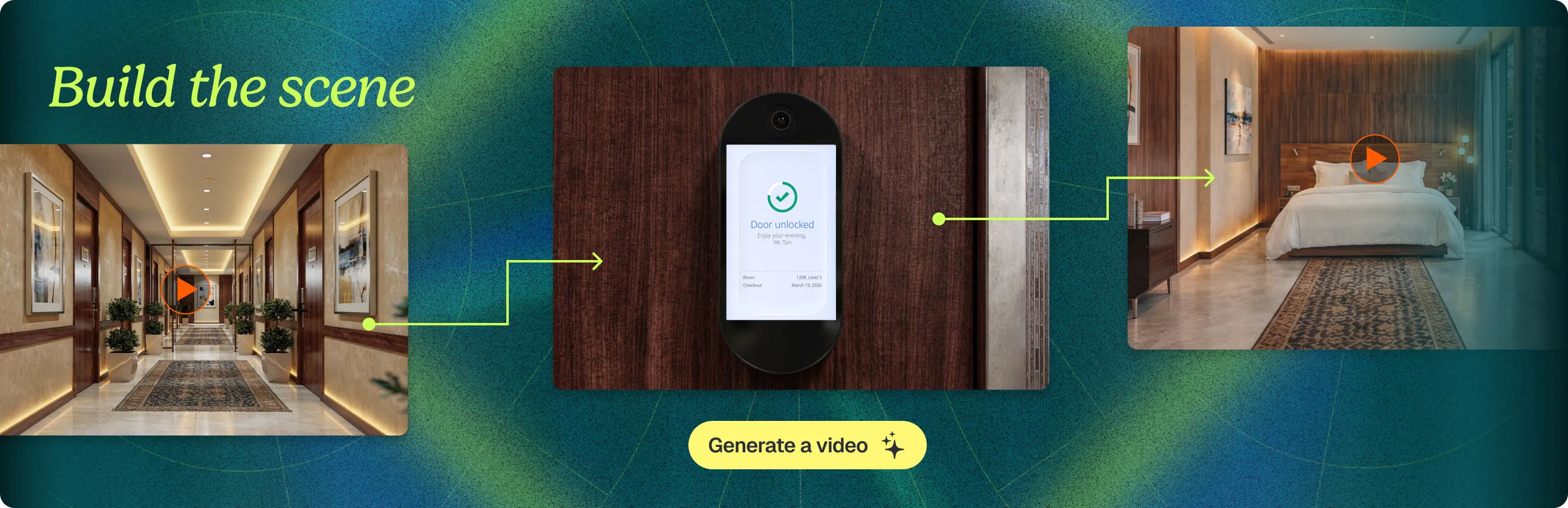
In our case, the exact element was hardware. On a recent client project, we had to rebuild a set of four scanner units in AI. For one, we had a clean 3D render to work from; for the rest we leaned on reference images of the client’s existing products. Only with those references did the peripherals come back accurate across every scene. References were the difference between a believable product and an obvious guess.

The takeaway: AI won’t hold your brand steady on its own. Lock the exact elements into references before the first shot, and the more precise the form, the more angles it needs.
AI’s Limits: Where the Human Touch Still Matters
AI video is capable, but it won’t get you to a finished video without refinement. It still slips on the precise details: hands come out wrong, physics gets loose, and fine detail tends to fall apart, especially on-screen text, which often comes out as gibberish. For a brand, those small details are the difference between polished and embarrassing.
The hardware was only the first battle. Getting the screens right on those same scanner units was harder, and it’s where the work moved back to people. AI defaults to placeholder text that doesn’t hold up close, nonsense letters and decorative icons, so we had a UI/UX (user interface and experience) designer build the interfaces by hand. The copy was real product language, not decoration: “Entry confirmed. Enjoy the game.” on the stadium gate, “Authenticated. Have a safe journey.” at the toll lane. That one designed system was then carried across the devices.
Editing still needs a human touch. AI hands you clips, never the finished cut, so the shot order, the pacing, the transitions, and the effects are all assembled by a person. On the same project, AI generated a face-mesh overlay that came back too heavy, and an editor pulled it back by about half until it read as a touch, not a graphic. The model makes the parts. A person decides how they go together.

None of this is a reason to avoid AI. It’s the reason the finishing is still yours. AI does the heavy lifting, fast, and the last pass is human.
The takeaway: AI builds most of the video. The last details, the ones people actually notice, still need a human.
AI makes the clips. You make the cut.
AI can build the settings now, the lobby, the stadium, the street that never existed, fast and at a scale no budget used to allow.
But it gives you clips, never finished work. The decisions still need human guidance. What to shoot and what to generate. How the clips cut together. When to pull an effect back before it tips into too much.
So let AI move fast on what it does well, building the settings, and stay close to the parts people actually look at: the product, the screens, and the final edit. Get that right and no one can tell where the camera stopped and the model started. That is the entire point.
