


AI image generation has a sameness problem. One strong image is easy. A campaign that holds together across a website, an ad platform, and a sub-brand is where the work falls apart. At Hire Digital, we built a visual system method (visual direction, model selection, prompt logic, refinement) and applied it across campaign work for one of Singapore’s largest banks and our own brand. Two brand contexts on our own site, no shoots. Here’s how the method works, where it breaks down, and the version of it you can build yourself.
The myth: better prompts make better images
Better prompts don’t make better campaign images. They make better single images. The moment you need a set that holds together across a website, an ad platform, or a sub-brand, the prompt stops being the variable that matters. Prompts are tactics. Visual systems are strategy.
This post breaks down the visual system method we use at Hire Digital, the work it produced across our own brand and client campaigns, and a version you can apply yourself.
The method in production
Two examples. A client campaign and an internal image library. Both produced through the same four-stage system.
Marketing campaigns for one of Singapore’s largest banks

The brief: The private wealth management arm of one of Singapore’s largest banks needed a campaign positioning the brand as a global wealth gateway for high net worth clients with international financial needs. Three audience pillars: clients moving abroad (Live), building careers abroad (Work), or sending family members to study abroad (Study). Three formats per pillar (web banner, vertical poster, square social).
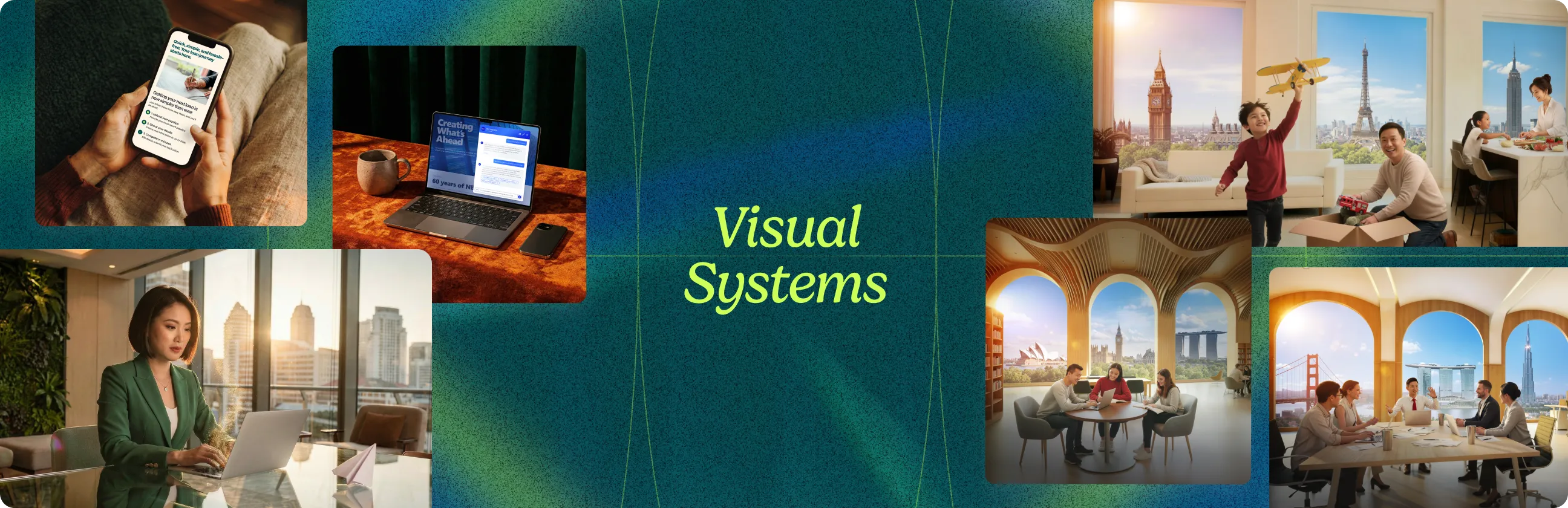
The challenge: Each pillar needed its own visual world. All three needed to hold together as one campaign. A traditional shoot would have meant multiple location days, three sets of cast, three art direction packages, and a multi-month timeline before anything reached market. The campaign also called for a gateway metaphor: arched windows looking out at three world cities at once. That composition is awkward to shoot and natural for AI to generate.
What we did: Stage one locked the visual system. Arched window architecture in every scene. A three-skyline horizon technique behind the subjects (London, Singapore, New York for Live; San Francisco, Singapore, Shanghai for Work; London, Singapore, Sydney for Study). Warm interior lighting against cool exterior. Real-feeling protagonists across age and life stage. The same typography lockup, the same red callout treatment, the same brand-exact details. Flux.2 Max generated the photorealistic bases. Nano Banana 2 handled per-asset edits, aspect ratio variations, and refinement.
The outcome: A full campaign across three audience pillars and three formats per pillar. Roughly one month from concept to delivery, including revisions. The visual system held across every asset, which is the part that matters when the client is a private bank speaking to high net worth audiences.
The takeaway: The harder the brief, the more the system earns its place.
A custom image library for Hire Digital and Global Hiring

The brief: A reusable image library for Hire Digital’s main site and the Global Hiring sub-brand. The library needed to produce on-brand images across multiple page contexts (Digital Labs verticals, Global Hiring product pages, blog covers, marketing assets) without re-briefing the visual direction every time.
The challenge: A library is a different problem from a campaign. A campaign needs a set of images that hold together for one launch. A library needs to produce images that still hold together six months and twenty briefs later, even as the team adds new use cases. The visual rules have to be locked tightly enough to survive new contexts.
What we did: Stage one locked the visual language across both brand contexts: warm directional lighting, cinematic depth, real-feeling subjects across age and demographic, soft bokeh treatment, a recurring prism light motif as a signature element. The library is generated through Flux.2 Max with our locked prompt patterns, then refined per asset through Nano Banana 2 for context-specific edits and aspect ratio variations.
The outcome: A working image library that produces on-brand visuals for both the main site and the sub-brand. The same system handles editorial portrait work, product-in-context shots, and abstract concept imagery without drift.
The takeaway: A campaign is a sprint. A library is a system that keeps running.
The four stages
Stage 1: Visual direction
Before anyone opens an AI tool, the team builds a reference board. Not stock photography. Not Pinterest scrapes. Specific images chosen for specific reasons: lighting, composition, color palette, texture, posture, mood. Every reference earns its place against a clear filter.

AI defaults to the generic register when nothing constrains it. Call it AI sameness, the visual middle every model gravitates to without direction. The reference board is what gives the system a point of view to generate against.
The takeaway: Visual direction isn’t a mood board. It’s a system the AI generates inside of.
Stage 2: Model selection
We use two models in sequence, not as alternatives.
Flux.2 Max generates the photorealistic base. Released by Black Forest Labs in late 2025, it’s the top-tier variant in the Flux 2 family. Strong on skin texture, real-world lighting, multi-reference editing, and character consistency across a set. Every photorealistic image in this post started here.
Google Nano Banana 2 handles the edits. Released in February 2026, it’s purpose-built for instruction-following on existing images. Where Flux.2 Max is the camera, Nano Banana 2 is the retoucher. We use it after the first generation: adjusting a prop, fixing a hand, modifying lighting in one corner, adapting an image for a different aspect ratio.
The takeaway: One model generates. The other refines. Most teams stop after the first.
Stage 3: Prompt logic
By the time a prompt gets written, most of the creative decisions are already made. The reference board defines the look. The model defines what’s achievable. The prompt’s job is to translate those decisions into language the model understands.
A strong prompt names the camera, the subject, the lighting, the background, and the realism anchors. Anything you don’t name, the model hallucinates and tries to fill the gap with random things.
Leave the background unspecified and you get random cables, unpainted walls, exposed pipes. Leave skin texture unspecified and you get either airbrushed plastic or exaggerated pores. There’s rarely a middle ground unless you write one.

The takeaway: Prompts don’t generate images. They translate decisions.
Stage 4: Refinement
This is the stage most teams skip and the reason most AI work feels off.
A generated image is rarely campaign-ready out of Flux.2 Max. Lighting may be flat. Skin may be too smooth. A prop may sit awkwardly.
Refinement happens in two ways. Targeted edits go through Nano Banana 2: adjusting a prop, fixing a hand, modifying lighting in one corner, swapping out an element that didn’t land. Bigger problems, like replacing one symbolic object with another or shifting a subject’s cultural specificity, mean going back to stage one with a tighter prompt and a new generation. Sometimes the right call is to scrap and restart.

The takeaway: Generation produces options. Refinement produces deliverables.
Three honest limits
Character consistency at scale still requires workflow. Both Flux.2 Max (up to 10 reference images) and Nano Banana 2 (up to 5 consistent characters across batches of up to 20 images) handle within-batch consistency well. The harder problem is consistency across batches, over time, and at high volume. Subtle drift starts to creep in across longer projects: a different jawline, a slightly different skin tone, eyes that read as a different person. For campaigns that depend on a recurring protagonist with absolute fidelity across thirty plus images and multiple production cycles, AI alone isn’t enough.
Cultural specificity takes work. “An Asian woman” gives you a generic composite. A Singaporean office worker, an Indonesian retail context, a Japanese hospitality setting, each requires prompt detail most teams don’t write. Without it, the output reads as stock in a way local audiences notice.
Brand-exact details still need post-production. Hex-code color matching now works in Flux.2 Max, which handles exact brand colors correctly. But complete logo lockups, full typographic systems, and the precise application of a brand system remain unreliable out of the model. Every image we ship goes through a final pass in design software.
The takeaway: AI handles roughly 80 to 90 percent of the visual production work. The last 10 to 20 percent is what separates a brand from AI sameness.
Where this method fits
The method scales. One designer can run it for a single page. A small team can run it for a campaign. The output quality depends less on team size and more on discipline. Build the reference board first. Generate in Flux.2 Max, edit in Nano Banana 2. Curate ruthlessly before refining. Plan a final design pass for brand-exact details.
Where it breaks: when consistency needs to hold across thirty plus assets, multiple sub-brands, and ongoing volume. The method doesn’t change. The operational discipline of running it at that scale does. That’s where production capacity, dedicated direction, and a tight feedback loop start to matter more than the framework itself.
If your team is producing AI images one at a time and the visual system is drifting between them, that’s where we come in.
Both shapes of work, one method underneath

The bottom line
For one or two AI images on a single page, the prompt is most of the battle. For a campaign system that holds across product pages, sub-brands, and channels, the prompt is a small part of the work. Visual direction, model sequencing, curation, and refinement are the rest.
The prompt gets you in the room. Your creative eye gets you the image.
One image is luck. A campaign is a system. A brand is a discipline.