


gradient vector gradient vector

Social Media Marketing Prompt Generator

Copy-paste prompts for social media marketing, filled with your topic and tailored to the AI model you use. Pick your model, enter a topic, and grab the prompts you need — or open them in one click.

Tailor prompts for

Structured XML framing and explicit step-by-step reasoning.

Content ideation

30 post ideas

Turn one theme into a month of varied post ideas.

You are a senior social media strategist. Work through the task carefully before you answer.

<task>
Generate 30 social media post ideas about "[your topic]" for [your audience]. Mix formats (educational, behind-the-scenes, opinion, listicle, story, question, meme, user-generated). For each idea, give a one-line concept, the best format, and the hook angle. Present it as a table.
</task>

Note any assumptions in a single line first, then give your answer with clear headings and a markdown table wherever it makes the result easier to scan.

Content pillars

Define 4–6 repeatable content pillars for the brand.

You are a senior social media strategist. Work through the task carefully before you answer.

<task>
Define 4–6 content pillars for [your brand]'s social media around "[your topic]", aimed at [your audience]. For each pillar, explain what it covers, why it matters to the audience, the goal it serves (awareness, trust, conversion), and 3 example post concepts.
</task>

Note any assumptions in a single line first, then give your answer with clear headings and a markdown table wherever it makes the result easier to scan.

Hooks & captions

Scroll-stopping hooks

Ten thumb-stopping opening lines for a post or reel.

You are a senior social media strategist. Work through the task carefully before you answer.

<task>
Write 10 scroll-stopping hooks (first lines) for a social post about "[your topic]" aimed at [your audience]. Vary the angle — curiosity, contrarian, problem/agitate, bold claim, question, stat. Keep each under 12 words and note which emotion or angle it uses.
</task>

Note any assumptions in a single line first, then give your answer with clear headings and a markdown table wherever it makes the result easier to scan.
Caption with CTA

A full caption with hook, value, and a clear call to action.

You are a senior social media strategist. Work through the task carefully before you answer.

<task>
Write a complete social caption about "[your topic]" for [your brand], speaking to [your audience]. Open with a strong hook, deliver one clear takeaway, and end with a specific call to action. Keep the tone natural and conversational, and suggest 2 alternative CTAs I could swap in.
</task>

Note any assumptions in a single line first, then give your answer with clear headings and a markdown table wherever it makes the result easier to scan.
Hashtags & discovery

Hashtag set by reach tier

A researched hashtag mix split into broad, niche, and branded tiers.

You are a senior social media strategist. Work through the task carefully before you answer.

<task>
Build a hashtag set for a post about "[your topic]" aimed at [your audience]. Group 20–25 hashtags into three reach tiers: broad/high-volume, mid-size/niche, and small/branded or community tags. For each, note roughly how competitive it is and why it fits. Present it as a table.
</task>

Note any assumptions in a single line first, then give your answer with clear headings and a markdown table wherever it makes the result easier to scan.

Discovery & SEO keywords

Searchable keywords to work into captions and on-screen text.

You are a senior social media strategist. Work through the task carefully before you answer.

<task>
Suggest 15 searchable keywords and phrases people use when looking for content about "[your topic]" on social platforms. Note where to place each one (caption, on-screen text, alt text, profile bio) to improve in-app search discovery for [your brand].
</task>

Note any assumptions in a single line first, then give your answer with clear headings and a markdown table wherever it makes the result easier to scan.
Platform playbooks

Instagram playbook

Adapt the topic for Instagram's formats and tone.

You are a senior social media strategist. Work through the task carefully before you answer.

<task>
Adapt "[your topic]" into an Instagram content plan for [your audience]. Recommend the best mix of formats (Reels, carousels, single posts, Stories), ideal caption length and tone for Instagram, on-image text guidance, posting cadence, and 3 ready-to-shoot post concepts with hooks.
</task>

Note any assumptions in a single line first, then give your answer with clear headings and a markdown table wherever it makes the result easier to scan.
LinkedIn playbook

Adapt the topic for LinkedIn's professional, text-led feed.

You are a senior social media strategist. Work through the task carefully before you answer.

<task>
Adapt "[your topic]" into a LinkedIn content plan for [your brand], speaking to [your audience]. LinkedIn rewards text-led posts, professional but human tone, and a strong first two lines before the "...see more" cutoff. Give 3 post drafts (each with a hook line, body, and CTA) plus advice on ideal length and document/carousel use.
</task>

Note any assumptions in a single line first, then give your answer with clear headings and a markdown table wherever it makes the result easier to scan.

TikTok playbook

Adapt the topic for short-form video and trends.

You are a senior social media strategist. Work through the task carefully before you answer.

<task>
Adapt "[your topic]" into a TikTok plan for [your audience]. TikTok rewards fast hooks in the first 2 seconds, native casual tone, trending sounds, and 15–45 second runtimes. Give 3 video concepts with a script outline (hook, build, payoff), on-screen text, and a suggested sound or trend type for each.
</task>

Note any assumptions in a single line first, then give your answer with clear headings and a markdown table wherever it makes the result easier to scan.

X / Twitter playbook

Adapt the topic for X's short, punchy, thread-friendly feed.

You are a senior social media strategist. Work through the task carefully before you answer.

<task>
Adapt "[your topic]" into an X (Twitter) plan for [your brand], speaking to [your audience]. X rewards punchy single posts under 280 characters and well-structured threads. Give 3 standalone posts and 1 thread outline (hook tweet plus 5–7 follow-up beats), with a concise, conversational tone.
</task>

Note any assumptions in a single line first, then give your answer with clear headings and a markdown table wherever it makes the result easier to scan.

Content calendar

1-week posting calendar

A day-by-day week of posts across formats and platforms.

You are a senior social media strategist. Work through the task carefully before you answer.

<task>
Build a 1-week social media posting calendar for [your brand] around "[your topic]", aimed at [your audience]. For each day, give the platform, format, content pillar, post concept, hook, and CTA. Present it as a table with one row per planned post.
</task>

Note any assumptions in a single line first, then give your answer with clear headings and a markdown table wherever it makes the result easier to scan.

1-month content calendar

A four-week calendar balanced across pillars and goals.

You are a senior social media strategist. Work through the task carefully before you answer.

<task>
Build a 1-month (4-week) social media content calendar for [your brand] on the theme of "[your topic]" for [your audience]. Balance the posts across content pillars and goals (awareness, engagement, conversion), and aim for a realistic cadence. Present it as a week-by-week table with platform, format, concept, and goal for each post.
</task>

Note any assumptions in a single line first, then give your answer with clear headings and a markdown table wherever it makes the result easier to scan.

Engagement & community

Comment reply templates

On-brand replies for common comment types.

You are a senior social media strategist. Work through the task carefully before you answer.

<task>
Write reply templates for [your brand]'s social comments about "[your topic]", in a voice that suits [your audience]. Cover these comment types: praise, a question, a complaint, a sales-intent comment, and a troll. Keep replies warm, on-brand, and concise, and note when to take a conversation to DMs.
</task>

Note any assumptions in a single line first, then give your answer with clear headings and a markdown table wherever it makes the result easier to scan.

Community questions & polls

Engagement prompts, questions, and poll ideas to spark replies.

You are a senior social media strategist. Work through the task carefully before you answer.

<task>
Generate 12 engagement prompts about "[your topic]" to spark comments and shares from [your audience]. Include open questions, fill-in-the-blank prompts, "this or that" choices, and poll ideas. For each, note the platform it suits best and why it invites a response.
</task>

Note any assumptions in a single line first, then give your answer with clear headings and a markdown table wherever it makes the result easier to scan.

Ad & promo copy

Paid social ad variations

Multiple ad variants with hook, body, and CTA to test.

You are a senior social media strategist. Work through the task carefully before you answer.

<task>
Write 5 paid social ad variations for [your brand] promoting "[your topic]" to [your audience]. For each variant, give a scroll-stopping hook, a short benefit-led body, and a clear CTA, and label the angle it tests (pain point, social proof, urgency, curiosity, aspiration). Present them in a table ready for A/B testing.
</task>

Note any assumptions in a single line first, then give your answer with clear headings and a markdown table wherever it makes the result easier to scan.

Launch / promo announcement

An organic launch post plus supporting teaser and reminder posts.

You are a senior social media strategist. Work through the task carefully before you answer.

<task>
Write a launch announcement post for [your brand] about "[your topic]" aimed at [your audience], plus 2 teaser posts to run before it and 1 reminder post to run after. Keep the announcement celebratory but clear about the offer and CTA, and tailor tone for a general social feed.
</task>

Note any assumptions in a single line first, then give your answer with clear headings and a markdown table wherever it makes the result easier to scan.

Analytics & reporting

Turn metrics into insights

Paste your numbers and get insights plus next actions.

You are a senior social media strategist. Work through the task carefully before you answer.

<task>
I will paste my recent social media metrics for content about "[your topic]". Analyze them and return: what's working and what isn't, the likely reasons, 2–3 patterns worth noting, and a prioritized list of next actions to improve reach and engagement for [your audience]. Be specific and avoid generic advice.

Metrics:
"""
[paste your metrics here]
"""
</task>

Note any assumptions in a single line first, then give your answer with clear headings and a markdown table wherever it makes the result easier to scan.

Monthly performance report

Summarize a month of results into a stakeholder-ready report.

You are a senior social media strategist. Work through the task carefully before you answer.

<task>
Turn the social media results I paste below into a concise monthly report for [your brand] on the theme "[your topic]". Include a one-paragraph summary, a table of key metrics with the trend versus last period, top and bottom performing posts with the likely reason, and 3 recommendations for next month.

Results:
"""
[paste your results here]
"""
</task>

Note any assumptions in a single line first, then give your answer with clear headings and a markdown table wherever it makes the result easier to scan.

Workflow loops

Batch over a topic list

Loop over a pasted list and produce one row per item.

You are a senior social media strategist. Work through the task carefully before you answer.

<task>
Here is a list of post topics related to "[your topic]". For EACH item in the list, repeat the following and output one table row: write a hook, a one-line caption, a CTA, and 3 hashtags suited to [your audience]. Process every item in the list before stopping, and do not skip any.

List:
"""
[paste your list of topics, one per line]
"""
</task>

Note any assumptions in a single line first, then give your answer with clear headings and a markdown table wherever it makes the result easier to scan.

Repurpose loop across platforms

Take one long post and loop it into platform-native variations.

You are a senior social media strategist. Work through the task carefully before you answer.

<task>
Take the one long-form post about "[your topic]" that I paste below and repurpose it into platform-native variations for [your audience]. Loop through each platform in this order — Instagram, LinkedIn, TikTok, X (Twitter) — and for each one, rewrite the content to fit that platform's format, length, and tone, keeping the core message intact. Output a clearly labeled section per platform.

Long-form post:
"""
[paste your long-form post here]
"""
</task>

Note any assumptions in a single line first, then give your answer with clear headings and a markdown table wherever it makes the result easier to scan.

Iterate a hook until it passes

Write, self-check against criteria, and rewrite until it passes.

You are a senior social media strategist. Work through the task carefully before you answer.

<task>
Write a hook for a post about "[your topic]" aimed at [your audience]. Then check it against these criteria: (1) under 12 words, (2) creates curiosity or tension, (3) names the payoff or benefit. If it fails any check, rewrite it and re-check. Loop until all three checks pass, then output the final hook and the checklist showing each criterion passing.
</task>

Note any assumptions in a single line first, then give your answer with clear headings and a markdown table wherever it makes the result easier to scan.

Expand a pillar until 30 ideas

Nest angles into ideas and keep expanding until a threshold.

You are a senior social media strategist. Work through the task carefully before you answer.

<task>
Start with the content pillar "[your topic]" for [your audience]. Generate 5 distinct angles from it, then for each angle generate 3 post ideas. Keep expanding until you have at least 30 post ideas in total; if you fall short, generate more angles and repeat. Once you reach 30, stop and present everything as a nested list grouped by angle.
</task>

Note any assumptions in a single line first, then give your answer with clear headings and a markdown table wherever it makes the result easier to scan.

Reference

How to prompt each model

Claude Anthropic
How to phrase

Wrap the task and any pasted content in XML tags (<task>, <brief>). Ask it to think first, then answer.

Best for

Long-form copy, on-brand voice, following multi-part instructions precisely.

Formatting

Request explicit headings and tables; tell it to state assumptions up front.

ChatGPT OpenAI
How to phrase

Open with a role ('Act as a senior social media strategist') and ask for step-by-step reasoning.

Best for

Fast ideation, versatile formats, browsing for current trends on supported plans.

Formatting

Ask for numbered lists or tables; tell it to browse when you need current examples.

Gemini Google
How to phrase

Tell it to use Google Search to ground answers in current trends and real posts.

Best for

Native Google Search grounding; fresh trend data; large context.

Formatting

Ask for a table and inline source citations.

Perplexity Perplexity
How to phrase

Phrase as a research request and demand current, cited examples.

Best for

Always cites sources; strong for trend and competitor research.

Formatting

Ask for concise, scannable output with citations.

Grok xAI
How to phrase

Ask directly and tell it to pull live trends from X and the web.

Best for

Real-time pulse on X trends and current conversations.

Formatting

Ask for a concise table and have it cite the posts it referenced.

Understand

Why prompts beat a blank box

An AI chat is only as good as the prompt you give it. Asking “write me a post” gets you generic filler; a well-scoped prompt — with the platform, the audience, and the format spelled out — gets you a month of post ideas or a ready-to-shoot caption in seconds. These snippets package that structure so you don't have to rewrite it every time, and the workflow loops let one prompt do repetitive work in a single pass.

Models differ, too. Perplexity, Gemini, and Grok can pull current trends and real examples, so their prompts ask for fresh, cited data; Claude responds well to explicit structure; ChatGPT likes a role and a step-by-step nudge. Treat the output as a fast first draft — adapt the voice to your brand and sanity-check any trend or claim before you post it.

FAQ

Frequently asked questions

What does this tool do?

It gives marketers a library of ready-to-paste AI prompts for social media — post ideas, hooks and captions, hashtags, platform playbooks, content calendars, engagement replies, ad copy, analytics, and iterative workflow loops. Type your topic and the prompts fill in automatically, then copy the ones you need or open them straight in your AI tool.

Why does it ask which AI model I'm using?

The same social task works best when it's phrased for the model you're using. Pick Claude, ChatGPT, Gemini, Perplexity, or Grok and every prompt is re-framed to play to that model's strengths — Claude gets structured XML framing and step-by-step reasoning, ChatGPT gets role priming and a nudge to check current trends, Gemini leans on Google Search grounding, Perplexity is told to cite current examples, and Grok is told to pull live trends from X and the web.

What is the "Open in" button?

Every prompt has an Open-in-tool button next to Copy. It copies the prompt to your clipboard and opens the model you picked in your browser — Claude, ChatGPT, Perplexity, and Grok open with the prompt already filled in; Gemini doesn't support prefilling from a link, so the button opens Gemini for you to paste.

Do I need an API key or paid plan?

No. The tool only generates the prompt text — everything runs in your browser and nothing is uploaded. You paste or open the prompt in whichever AI chat you already use (free or paid) to get the answer.

Are the prompts customized to my topic?

Yes. Whatever you type into the topic, brand, and audience fields is templated into every prompt. Leave a field blank and it keeps a bracketed placeholder like “[your topic]” so you can fill it in later.

What are the workflow loop prompts?

They use explicit iterative patterns so the model does repetitive work for you — batch over a pasted list and output one row per item, repurpose one post into every platform, rewrite a hook until it passes a checklist, or expand a pillar into ideas until it hits a threshold. They turn a single prompt into a small automated workflow.

Tools

More marketing tools

Tools and content carefully crafted by Hire Digital especially for you

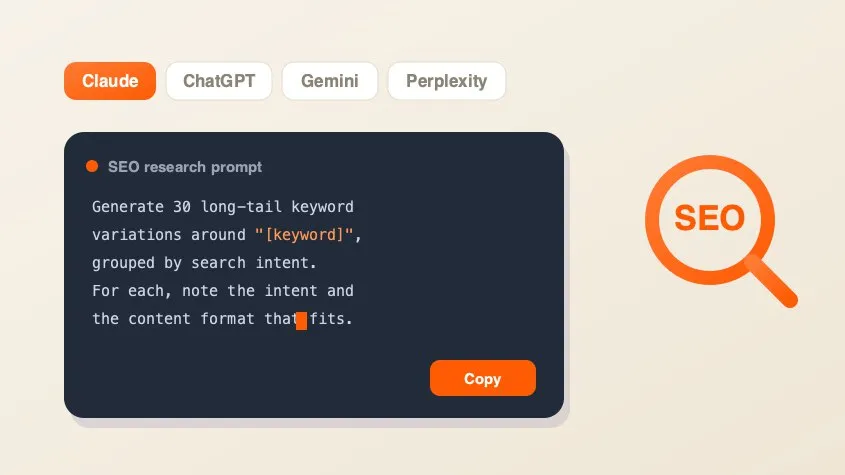
SEO AI Prompt Cheatsheet

SEO

SEO AI Prompt Cheatsheet

A free library of copy-paste AI prompts for SEO research — keyword research, search intent, content briefs, competitor gaps, and metadata. Tailored for Claude, ChatGPT, Gemini, Perplexity, or Grok and filled with your keyword.

Image Compressor

Marketing

Image Compressor

Compress and optimize JPG, PNG, and WebP images right in your browser using MozJPEG, libwebp, and OxiPNG. Reduce image file size without losing quality — no upload, no server.

Rich Results Preview & Schema Validator

SEO

Rich Results Preview & Schema Validator

Paste JSON-LD or page HTML and see live SERP rich-result previews for Article, Product, FAQ, Recipe, Event, Video, JobPosting, and more — with full Schema.org validation.

llms.txt Generator

SEO

llms.txt Generator

Generate an llms.txt file for your site — the Markdown index that tells ChatGPT, Claude, and Perplexity what your pages are. Crawls your sitemap and builds a clean index from your real page metadata.

QR Code Generator

Design

QR Code Generator

Generate clean, scannable SVG QR codes from any URL or text. Add a logo, customize colors, eyes, and module shape, then download as SVG or PNG.

Background Remover

Design

Background Remover

Remove backgrounds from photos using an on-device AI model. Drop in a JPG, PNG, or WebP and get a transparent cutout in seconds. Nothing is uploaded.

PDF Compressor

Marketing

PDF Compressor

Compress and optimize PDFs in your browser by recompressing embedded images with MozJPEG. Reduce PDF file size for scans, presentations, and image-heavy documents. Files never leave your device.

PDF Merger

Marketing

PDF Merger

Merge and combine multiple PDF files into one document, right in your browser. Reorder files before merging — lossless quality, no upload, no signup, no watermarks.